From deployment slop to production reality: How BriX bridges the gap with enterprise-grade AI infrastructure
Abstract
You’ve vibe-coded an AI assistant that’s a game-changer for your team. It works perfectly on your laptop. But when you try to deploy it company-wide, everything falls apart.
This is what is known as “deployment slop”—the messy reality when quick AI prototypes hit the enterprise world. Your tool suddenly becomes unreliable, insecure, and impossible to maintain. Different teams run different versions. Security flags it. IT won’t touch it. Your innovation dies.
BriX solves this. It’s a platform that takes your working AI prototype and makes it production-ready—without forcing you to become a full-stack developer. BriX handles the hard parts such as security, scaling, and data connections, so you can focus on building great tools. Switch between AI models like Claude or GPT with a click. Connect securely to your company’s data sources. Deploy once, and it just works—for everyone.
This article shows how BriX transforms AI deployment from an engineering bottleneck into a configuration task, enabling domain experts to ship enterprise-grade AI tools in days instead of months.
Introduction
Building AI tools has never been easier. With ChatGPT, Claude, and other Large Language Models (LLMs), anyone can prototype a useful AI assistant in an afternoon. Data analysts build metric query tools; product managers create research assistants. This rapid experimentation—”vibe coding”—has sparked innovation across organizations.
But then comes the hard part: deployment.
That brilliant tool you built on your laptop? It works great for you. But when your boss asks you to “roll it out to the whole company,” you hit a wall. Suddenly you need:
- Security reviews (Is it leaking sensitive data?)
- Reliability guarantees (What happens when 500 people use it at once?)
- Access controls (Who can see what data?)
- Audit trails (Who asked what, and when?)
- Consistent behavior (Why does it give different answers to different people?)
Most builders aren’t DevOps engineers. They’re domain experts who had a good idea. So these tools either:
- Never get deployed (innovation dies in a Jupyter notebook); or
- Get deployed badly (creating “Deployment Slop”—a mess of insecure, unreliable scripts).
The three failure modes of deployment slop
The chaos problem: Everyone’s running a different version
Marketing copies your script and tweaks the prompts. Finance changed the model from GPT-4 to Claude because it’s cheaper. Sales adds their own data sources. Within weeks, you have:
- Five different versions of “the same tool”.
- Wildly different answers to the same question.
- No one knows which version is “correct”.
- Teams making decisions based on inconsistent data.
Potential risk: A senior executive receiving conflicting answers from different teams, resulting in a loss of trust.
The reliability problem: It works until it doesn’t
Your laptop script was built for one user (you). Now 50 people are using it simultaneously. The result:
- Timeouts and crashes during peak hours.
- No error handling (users see cryptic Python stack traces).
- Rate limits hit on API calls.
- No monitoring or alerts when things break.
- You become the “on-call” support person for a side project.
Potential risk: The tool fails during a critical metric review leaving folks to find the solution manually.
The security problem: Accidental data leaks
Your prototype connects directly to production databases. It has your personal credentials hardcoded. There’s no:
- Access control (everyone sees all data, including sensitive info).
- Audit trail (no record of who queried what).
- Data governance (PII might be exposed).
- Compliance review (legal and security teams don’t even know it exists).
Potential risk: An employee inadvertently querying PII, resulting in a potential breach.
Who gets hit hardest?
This problem is especially painful for semi-technical builders—the domain experts who understand the business problem but aren’t DevOps engineers:
- Product Managers who write SQL but not Kubernetes configs.
- Data Analysts who know Python but not cloud security.
- Marketing Ops who build dashboards but not CI/CD pipelines.
- HR Analytics who understand people data but not infrastructure scaling.
The traditional solution is to “hand it to Engineering,” but they are backlogged for months. By the time they rebuild your tool “properly,” the business need has changed.
Solution: Enter BriX: From prototype to production in days, not months
BriX is a platform that solves the deployment problem by centralizing all the hard infrastructure work. Instead of forcing every builder to become a DevOps expert, BriX provides the production-ready foundation so you can focus on building great AI tools.
The core insight: Deployment doesn’t have to be an engineering problem. It can be a configuration problem.
What BriX does
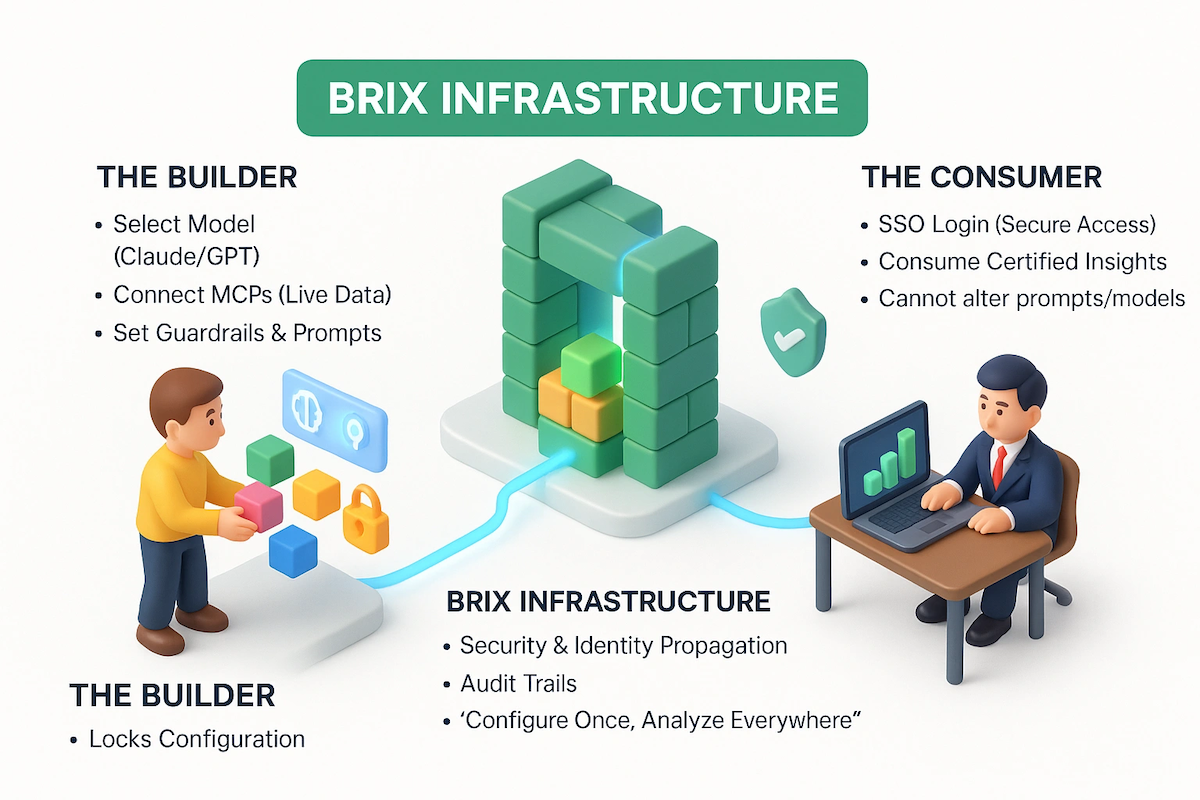
Think of BriX as the “production layer” for AI tools. You bring your working prototype. BriX handles security, scaling, data connections, monitoring, audit trails, and consistent behavior across teams.
You configure. BriX deploys.
The three core capabilities
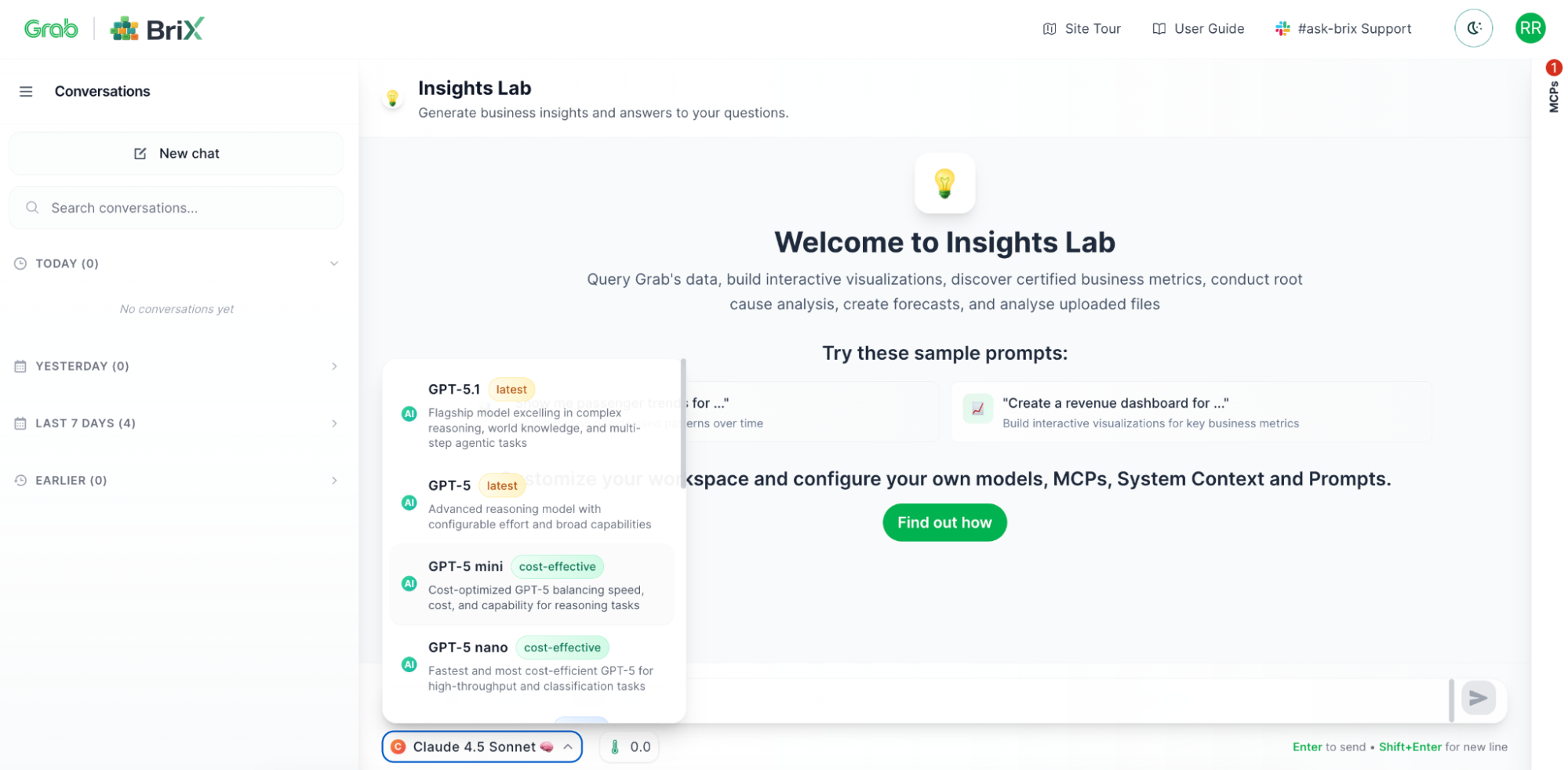
Choose your AI model (Model agnosticism)
Different tasks need different models. BriX lets you switch between models with a dropdown—Claude, GPT, Gemini, or others. Test which works best. Change models without rewriting code. Optimize for cost vs. performance.
Example: Your finance tool uses GPT-4 for complex analysis, but a new better model is available. Change it in BriX with one click—no code changes needed.
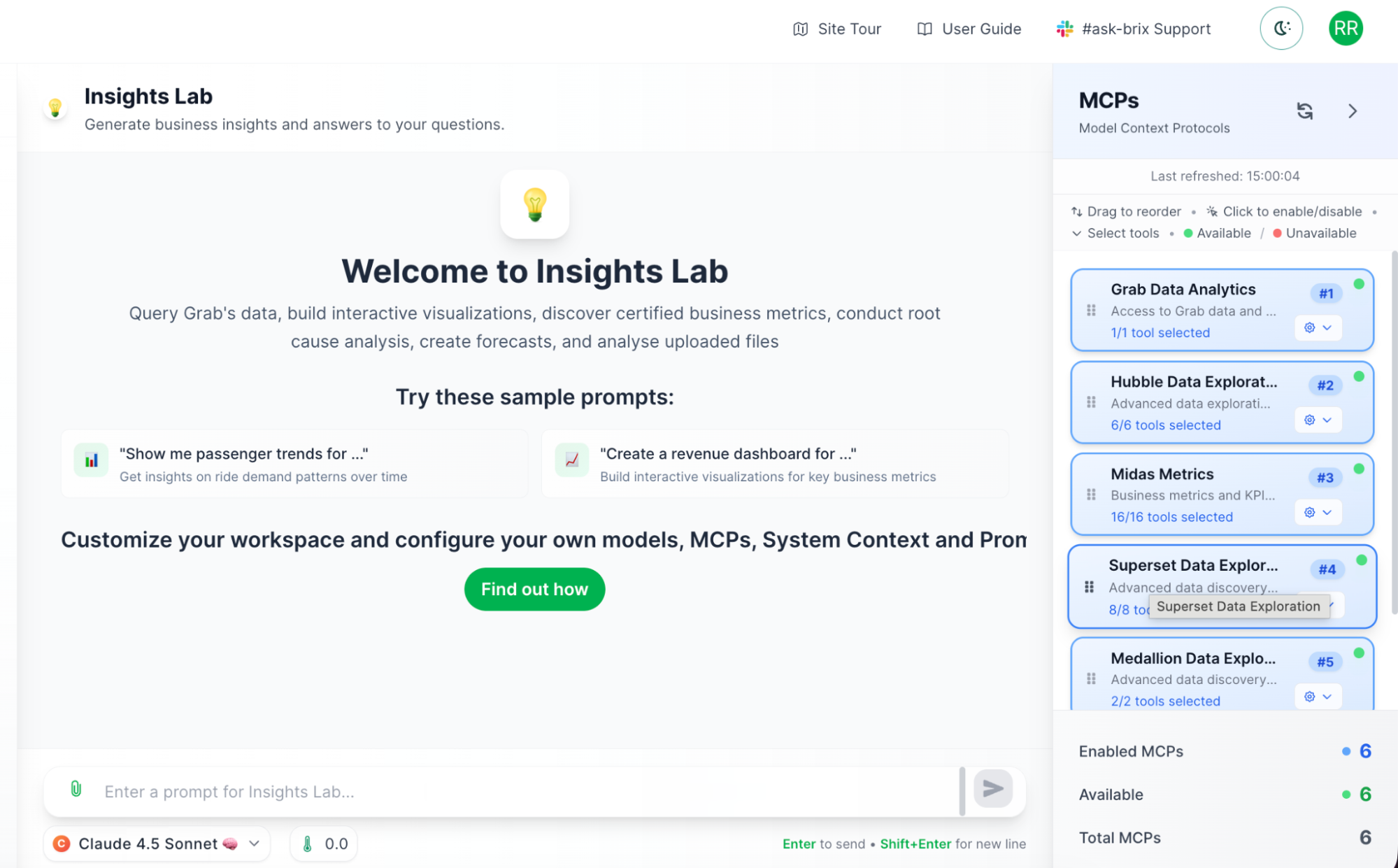
Connect to enterprise data securely (Model Context Protocols)
This is where BriX really shines. Your AI tool needs data—metrics, customer info, documentation. But connecting to enterprise systems securely is hard.
Model Context Protocols (MCPs) are BriX’s solution. Think of them as secure, pre-built connectors to your company’s data sources.
Why MCPs matter:
- Security built-in: No hardcoded credentials, proper access controls.
- Certified data: Connect only to approved, governed data sources.
- No custom integration: Pre-built connectors, not custom API code.
- Audit trails: Every query is logged automatically.
Example: Your marketing tool can query the metrics system to get conversion rates, search the knowledge base for campaign guidelines, and pull customer data from the data lake —all through secure, governed connections.
Technical note: MCPs use a standardized protocol, so adding new data sources doesn’t require rebuilding your tool. BriX handles the complexity.
Ensure consistent behavior (System prompts and context)
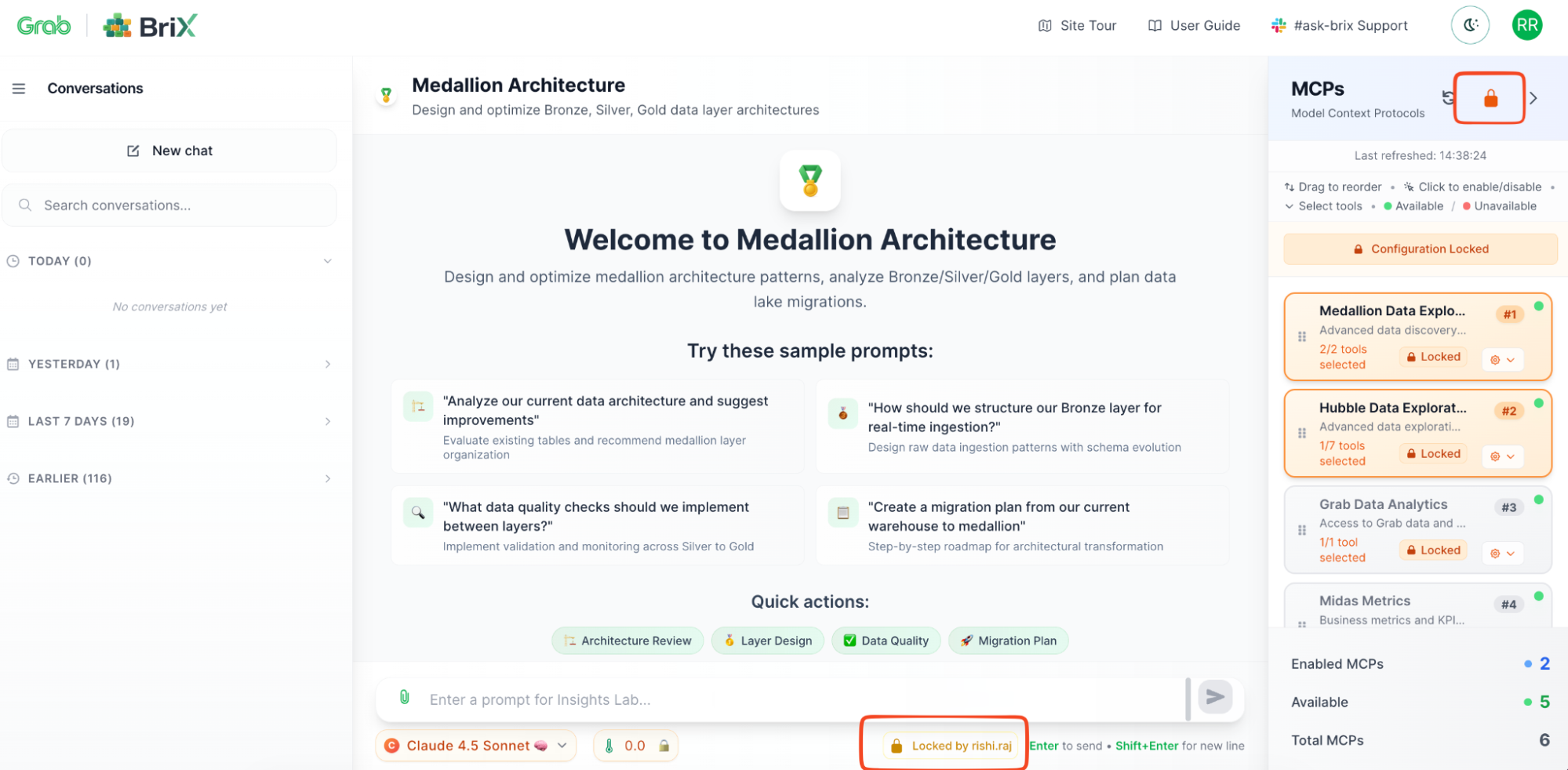
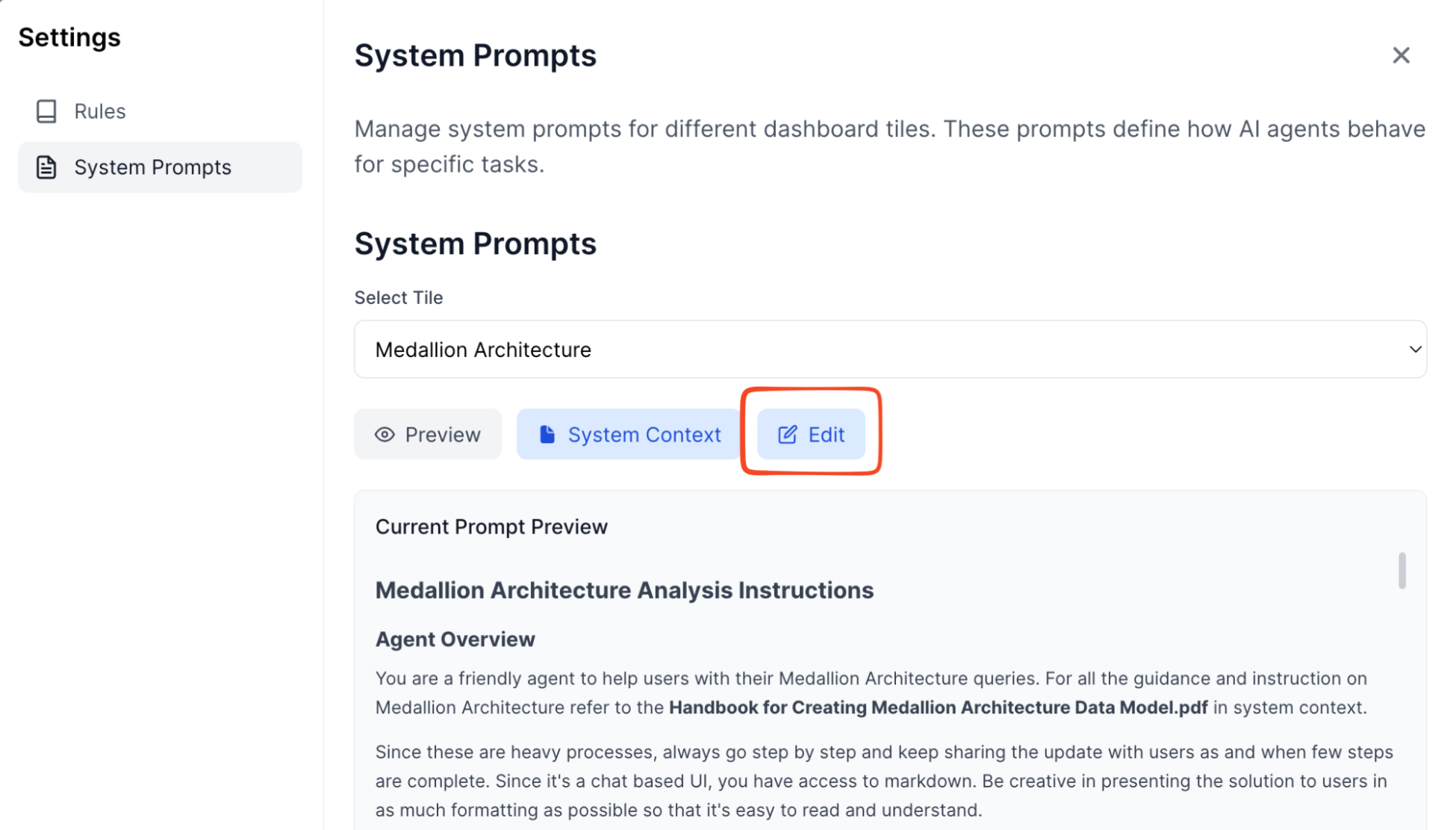
Remember the “chaos problem” where everyone runs different versions? BriX solves this with centralized configurations by allowing you to lock it down for the users:
- System prompts: Define your AI’s personality, tone, and guardrails once.
- Context files: Upload reference documents that every instance uses.
- Global enforcement: All users get the same behavior automatically.
Example: Your customer support tool has a system prompt that says “Always be empathetic, never make promises about refunds, escalate to humans for complaints.” Every support agent’s AI follows these rules—no exceptions.
Additional feature: Flexible interfaces and collaboration
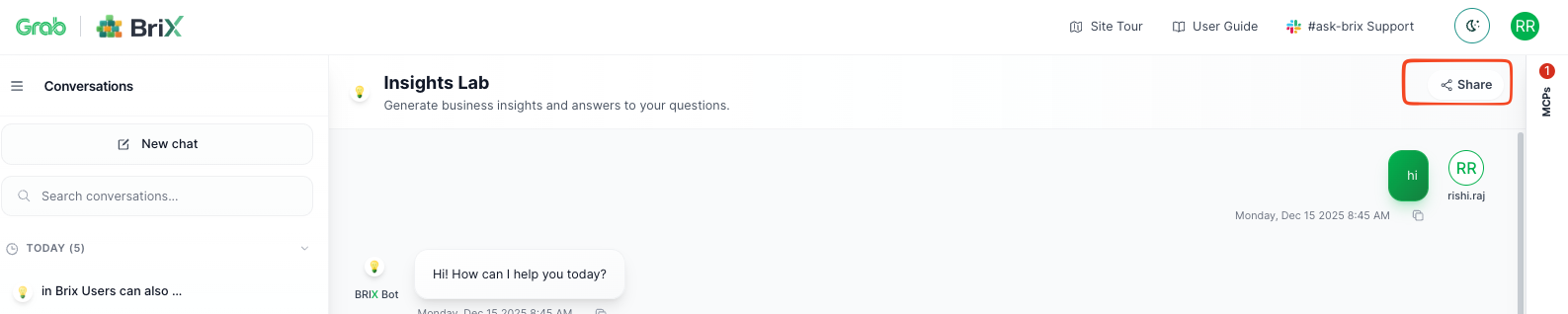
Beyond the core infrastructure, BriX offers flexible ways to consume these tools. BriX goes beyond conversational interfaces—you can host custom UIs built with any frontend framework while BriX handles the AI backend. Users can also generate and share analyses as persistent reports, turning individual queries into institutional knowledge accessible across teams via shareable links—complete with data, visualizations, and AI insights.
The BriX workflow: A real example
Let’s see how a product manager would use BriX:
Step 1: Upload your prototype
- You’ve built a Jupyter notebook that queries metrics and generates reports.
- Upload it to BriX (or connect your GitHub repo).
Step 2: Configure (Not code)
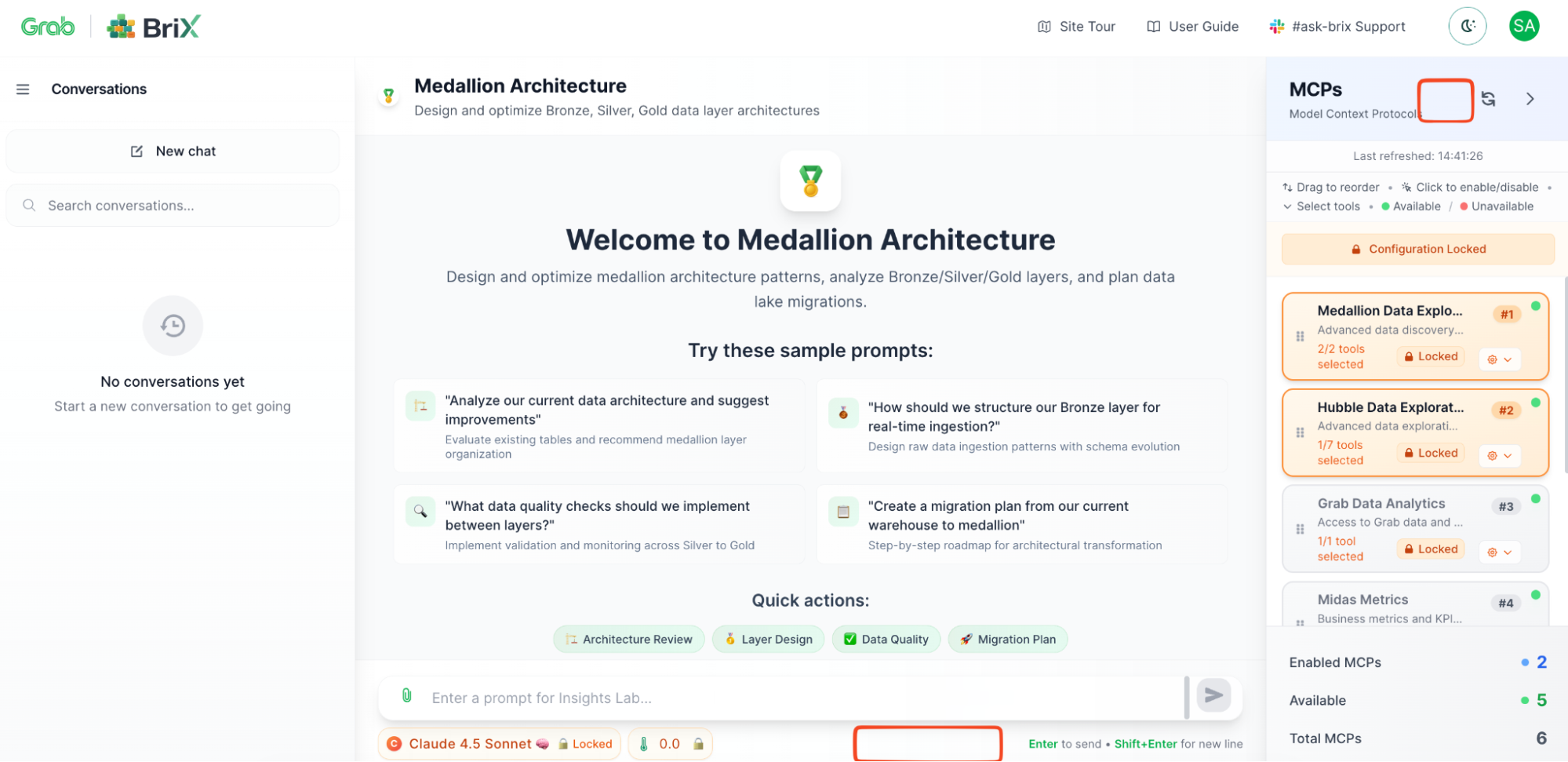
- Choose your AI model: Claude 4.5 Sonnet
- Connect data sources: Midas (metrics), Hubble (data lake)
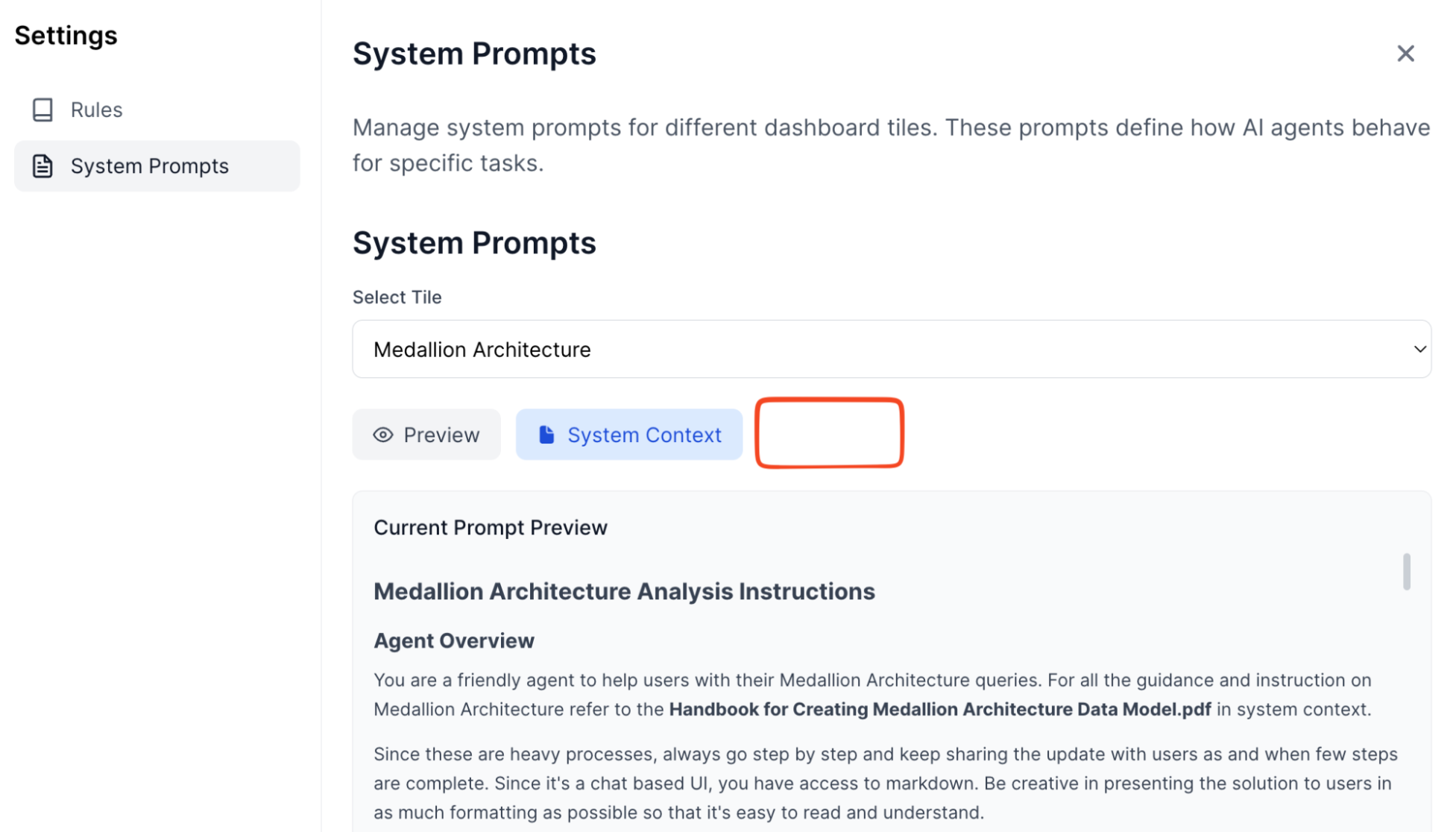
- Set system prompt: “You’re a data analyst. Always cite sources. Format numbers with commas.”
- Upload context: Your company’s metrics definitions guide.
Step 3: Lock
- Lock all the configurations of your BriX.
- Share with your team.
Step 4: It just works
- Certification by design with Brick Quality residing with the brick admin.
- Focused use cases have specific system prompts, context - minimizing hallucination concerns.
- People can use it simultaneously (BriX handles scaling).
- Everyone gets consistent answers (same model, same prompts).
- All queries are logged (audit trail automatic).
- The security team is happy (proper access controls).
- You’re not on-call (BriX monitors and alerts).
Time to production: 3 Days, not 3 months.
Under the hood: The BriX architecture
BriX is built on a synchronous streaming architecture—a design that prioritizes real-time responsiveness without sacrificing enterprise security. Think of it like a live sports broadcast: you see the action as it happens, not a delayed replay.
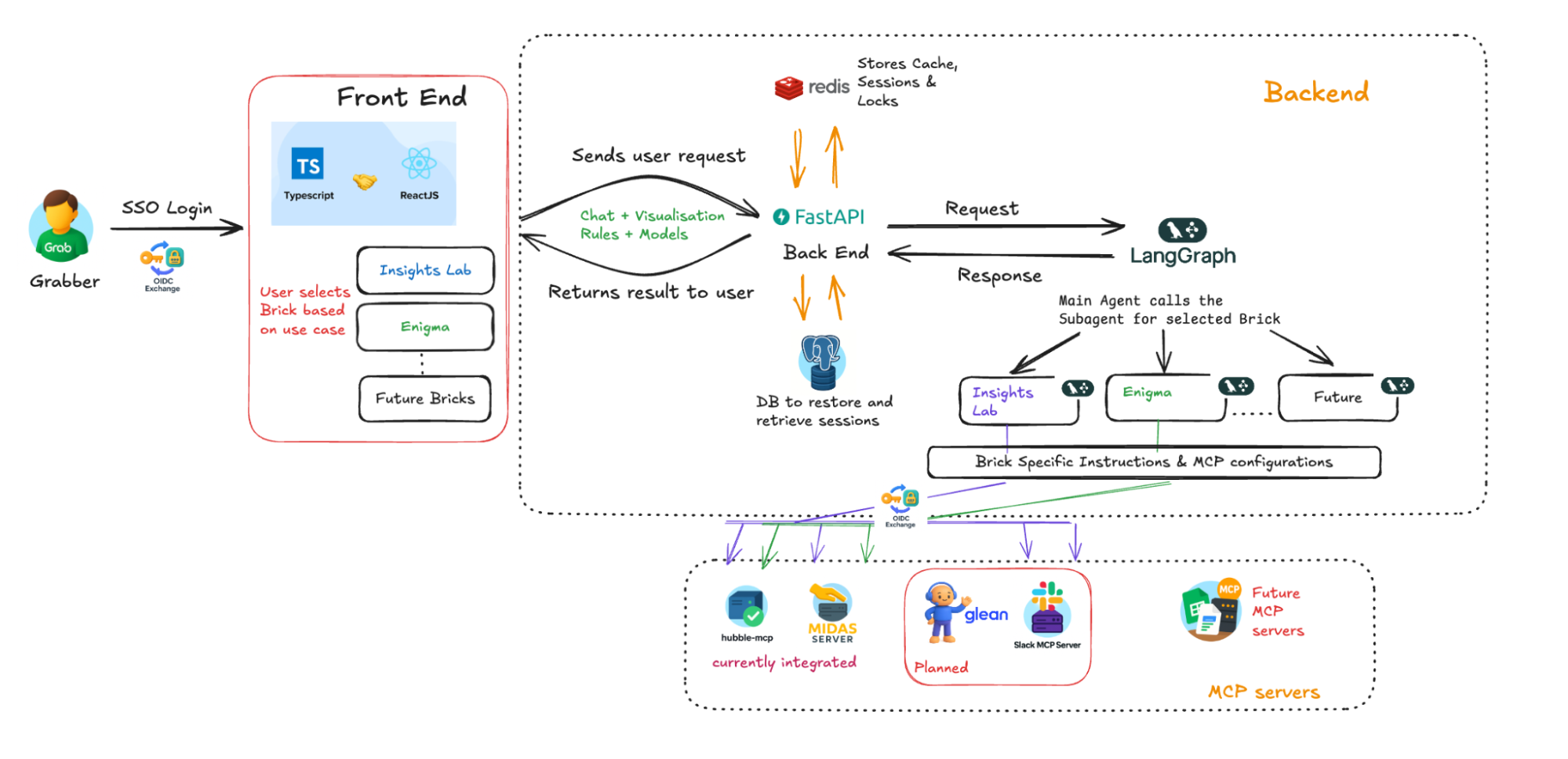
Here’s how a single user request flows through the system, from question to answer.
The request journey: Six layers
User Question
      ↓
[1] The Frontend — Real-Time Streaming
      ↓
[2] The Gateway — FastAPI Backend
      ↓
[3] The Brain — LangGraph Orchestration
      ↓
[4] Memory — Hot and Cold Storage
      ↓
[5] Security — Identity Propagation ("On-Behalf-Of" Flow)
      ↓
[6] Data Processing — Full Context, Not Fragments
      ↓
Response streams back to user in real-time
Let’s break down each layer.
Layer 1: The frontend — Real-time streaming
- Technology: React (TypeScript)
- User experience: ChatGPT-style interface
The User types a question: “What’s our conversion rate in Singapore last month?”
The frontend opens a persistent connection to BriX servers. As the AI processes the question, updates stream back instantly:
- “🤔 Thinking…”
- “📊 Querying metrics database…”
- “✅ Found 3 relevant data points…” [Final answer appears]
Why streaming matters:
| Traditional approach | BriX approach |
|---|---|
| ❌ User waits 30 seconds, sees nothing, then gets full answer (feels broken). | ✅ User sees progress every second (feels responsive and trustworthy). |
Technical implementation: Server-Sent Events (SSE) for real-time updates without WebSocket complexity.
Layer 2: The Gateway — FastAPI backend
- Technology: FastAPI (Python)
- Role: Central traffic controller
What it does:
- Receives all incoming requests
- Authenticates users (checks SSO tokens)
- Routes requests to the appropriate agent
- Manages rate limiting (prevents abuse)
- Handles errors gracefully
Why FastAPI?
- ⚡ Fast (async/await for concurrent requests)
- 🔒 Secure (built-in authentication)
- 📈 Scalable (handles thousands of concurrent users)
Layer 3: The Brain — LangGraph orchestration
- Technology: LangGraph (AI workflow framework)
- Role: The “main agent” that coordinates everything.
Think of LangGraph as a smart router that understands intent and delegates work.
Example flow:
User asks: “Compare our Singapore and Malaysia conversion rates, then explain why they differ”.
LangGraph analyzes the question:
- Task 1: Query metrics (needs Midas MCP)
- Task 2: Compare data (needs calculation)
- Task 3: Explain differences (needs context/knowledge base)
LangGraph delegates to specialized “MCPs”:
- Midas MCP: Queries Midas for conversion data
- LLM Agent: Calculates the difference
- Glean MCP: Searches knowledge base for regional factors
LangGraph synthesizes: Combines results into coherent answer Why modular “Bricks”?
- ✅ Reliability: Each Brick is specialized (fewer hallucinations)
- ✅ Maintainability: Update one Brick without breaking others
- ✅ Extensibility: Add new Bricks for new use cases
Layer 4: Memory — Hot and cold storage
BriX uses a two-tier memory system to balance speed and durability:
Hot memory (Redis):
- ⚡ Ultra-fast: In-memory storage (microsecond access).
- 🔄 Session management: Tracks active conversations.
- 🔒 Distributed locks: Prevents race conditions when multiple requests happen simultaneously.
- 💨 Temporary: Data expires after session ends.
Cold memory (PostgreSQL):
- 💾 Persistent: Data stored permanently
- 📜 Audit trail: Every query, response, and action logged
- 🔍 Searchable: Users can search past conversations
- 📊 Analytics: Track usage patterns and performance
Example scenario:
- You ask BriX a question → Hot memory tracks your active session
- You close the browser → Session data moves to cold memory
- You return tomorrow → BriX loads your history from cold memory
- You continue the conversation → New session in hot memory
Result: Fast responses + complete history + full auditability
Layer 5: Security — Identity propagation (“On-Behalf-Of” flow)
This is where BriX’s security model shines. Instead of using a single “service account” to access all data, BriX uses your credentials for every query.
How it works:
Step 1: Authentication (Login)
- You log in via SSO (e.g., Okta, Azure AD)
- BriX receives a secure token that represents your identity
- This token includes your permissions (what data you can access)
Step 2: Identity propagation (Query execution)
- You ask: “Show me customer revenue data”
- BriX doesn’t use its own credentials to query the database
- Instead, BriX carries your token to the data source
- The data source checks: “Does this user have permission to see revenue data?”
- If yes → Returns data
- If no → Access denied
Step 3: Audit trail
- Every query is logged with:
- Who asked (your user ID)
- What they asked (the question)
- What data was accessed (the query)
- When it happened (timestamp)
Why this matters:
| Traditional approach | BriX approach |
|---|---|
| ❌ Service account has access to ALL data. | ✅ Each user only sees their authorized data. |
| ❌ Can't tell who accessed what. | ✅ Complete audit trail per user. |
| ❌ Security team nervous about AI tools. | ✅ Security team approves (same controls as existing tools). |
| ❌ One compromised credential = full breach. | ✅ Breach limited to single user's permissions. |
Real-world example:
- Finance analyst asks about revenue → Sees all financial data (authorized)
- Marketing analyst asks same question → Sees only marketing budget (restricted)
- Same AI tool, different permissions → Security enforced automatically
Technical term: This is called “identity propagation” or “on-behalf-of flow” in enterprise security.
Layer 6: Data processing — Full context, not fragments
The old way (Retrieval Augmented Generation (RAG)):
- User asks a question.
- System searches for relevant document chunks.
- System sends top 5 chunks to AI.
- AI answers based on fragments.
Problem: AI might miss context from other parts of the document.
The BriX way (Full context):
- User uploads a document.
- BriX feeds the entire document into the AI’s context window.
- AI reads and understands the full document.
- AI answers with complete context.
Why this works now: Modern AI models (Claude, GPT-4) have massive context windows (100K+ tokens). They can process entire documents, not just snippets—resulting in more accurate answers and fewer hallucinations.
Example:
Question: “What’s our refund policy for international orders?”
- RAG approach: Finds 3 snippets about refunds → Might miss international-specific rules
- BriX approach: Reads entire policy document → Finds exact international refund section
Architecture summary: Why this design works
| Design choice | Benefit | User impact |
|---|---|---|
| Streaming architecture | Real-time feedback | Feels fast and responsive |
| Modular Bricks | Specialized agents | Fewer errors, more reliable |
| Hot/Cold memory | Speed + durability | Fast responses + full history |
| Identity propagation | User-level security | Only see authorized data |
| Full context processing | Complete understanding | More accurate answers |
The result: An AI platform that feels as fast as ChatGPT but with enterprise-grade security and reliability.
What using BriX actually feels like
All the technical architecture is invisible to end users. Here’s what they actually see and experience.
Login: One click, no new passwords
What users see:
- Visit BriX URL
- Click “Log in with SSO” (uses your existing company login)
- Redirects to familiar authentication screen
- Logged in automatically
What users DON’T see:
- No new account creation
- No password to remember
- No security questionnaire
- BriX inherits your existing permissions automatically
Why this matters: Zero onboarding friction. If you can access your email, you can use BriX.
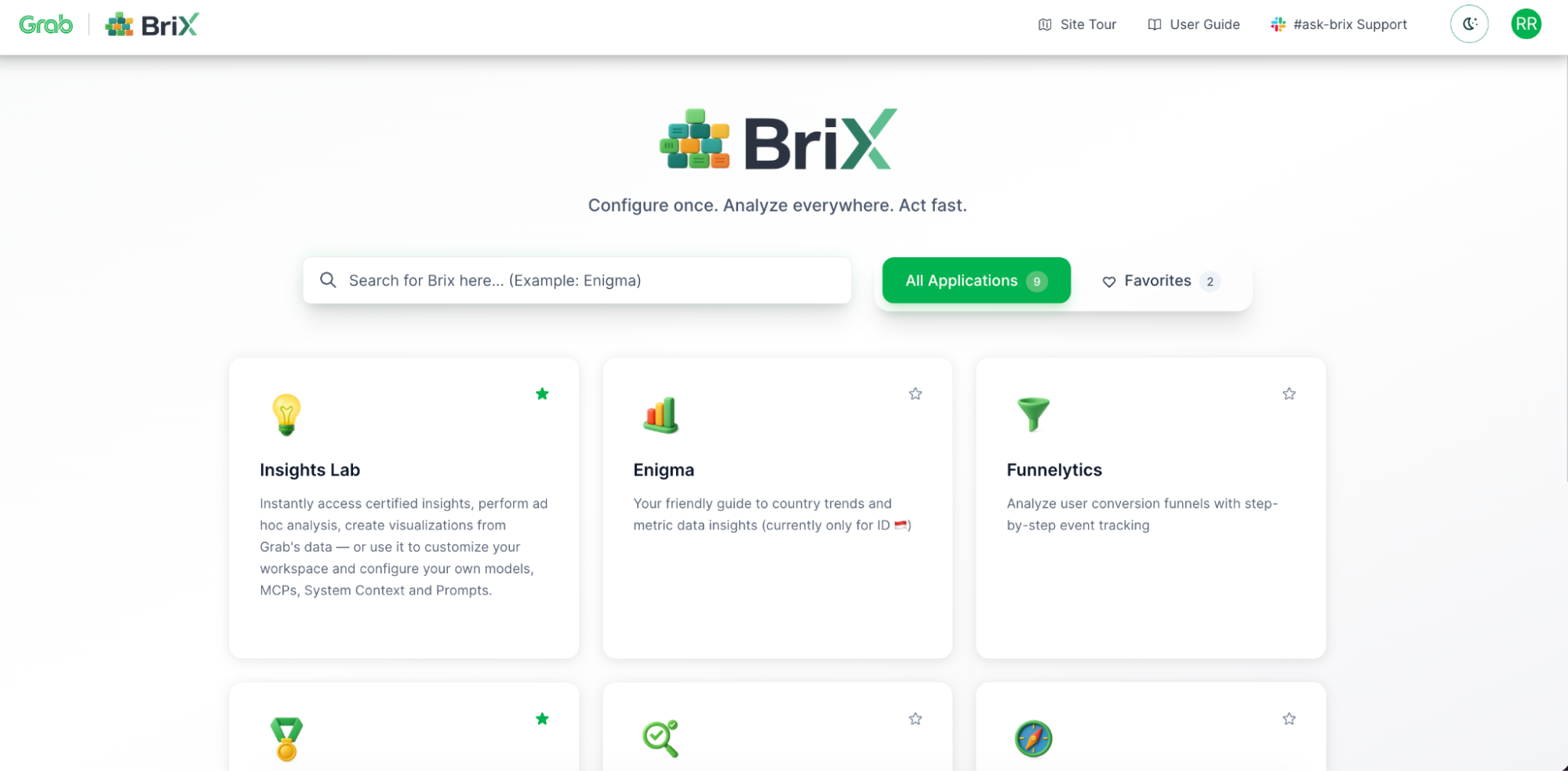
The app library: Your company’s AI tools
What users see: Company’s internal “App Store” for AI tools.
- Each tool is pre-configured and vetted
- Click to launch (no installation)
- Tools are tailored to company’s data and processes
Using a Tool: ChatGPT-style interface
What users see: See the AI “thinking” and “querying”—no black box waiting. Builds trust (“I can see it’s actually checking the data”).
Source citations: Every answer includes a data source. Click to view original data. No “trust me” answers.
Conversational follow-ups: “Why did it increase?” | “Compare to Malaysia” | “Show me a chart”
BriX remembers the context.
Data upload: Drag, drop, analyze
What users have:
- Files are processed securely (encrypted).
- AI reads the full content.
- Users can ask questions about the files.
- Files are only visible to the uploader (privacy).
Trustworthy answers: Certified data, not hallucinations
The problem BriX solves:
| ChatGPT/Generic AI | BriX |
|---|---|
| ❌ Makes up data ("hallucinations") | ✅ Only uses your company's real data |
| ❌ No source citations | ✅ Every answer cites the source |
| ❌ Can't access internal data | ✅ Connects to your data lakes, metrics, docs |
| ❌ Same answer for everyone | ✅ Respects your permissions (you only see your data) |
Why users trust it:
- ✅ Specific number (not vague)
- ✅ Source cited (can verify)
- ✅ Certified data (governance approved)
- ✅ Timestamp (know it’s current)
- ✅ Can export/verify (transparency)
The impact: What BriX actually changes
BriX shifts how organizations build AI tools. Here’s what that looks like in practice.
From months to days
| Traditional path | BriX path |
|---|---|
| 1. Domain expert has idea. | 1. Domain expert has idea |
| 2. Submits request to engineering. | 2. Configures the idea in BriX. |
| 3. Waits in backlog (weeks to months). | 3. Tests with small group. |
| 4. Engineering rebuilds it "properly". | 4. Deploys to production. |
| 5. Tool finally launches. | 5. Shares with team. |
What changes:
- ⚡ Speed (hours instead of months)
- 👤 Ownership (domain experts maintain their tools)
- 🔄 Iteration (refine based on feedback immediately)
- ✅ Success rate (ideas get tested instead of dying in backlog)
True democratization
Who builds tools with BriX:
The shift isn’t just engineers anymore. We’re seeing:
- Product managers building feature analysis tools.
- Data analysts creating custom dashboards.
- Marketing ops building campaign trackers.
- Sales ops creating pipeline monitors.
- HR analytics building retention tools.
What this means:
Domain expertise stays with domain experts (no translation loss). Engineering focuses on platforms (not individual tool requests). Innovation happens at business speed (not constrained by engineering capacity).
The reality check:
Not every domain expert will build tools (and that’s fine). Some tools still need engineering (complex integrations, custom logic). But the bottleneck shifts from “engineering capacity” to “good ideas.”
Flexibility without fragility
What you can change without rewriting code:
Swap AI models:
- Dropdown menu selection (GPT-5, Claude, Gemini)
- Different teams can setup different models for their BriX
- Can test new models without rebuilding tools
Add data sources:
- New MCP connector (one-time setup)
- All existing tools can access the new source
- No need to update individual tools
Update behavior globally:
- Change system prompt in one place
- All instances follow new rules immediately
- Useful for policy updates, compliance changes
Real example: When a company needs to update data access policies:
- Traditional approach: Update each tool individually (days/weeks)
- BriX approach: Update system prompt once (minutes)
Security that enables (Not blocks)
The traditional trade-off:
- Secure tools = slow approval, limited functionality
- Fast tools = security nightmares, compliance issues
BriX’s approach: Security is built into the platform, not added per tool.
What’s automatic:
- SSO authentication (no passwords to manage)
- Identity propagation (users see only their authorized data)
- Audit logging (every query tracked)
What this changes:
- Security team reviews the platform once (not every tool)
- Builders don’t need to become security experts
- Compliance is automatic (audit trails, access controls)
- Tools can move fast without sacrificing governance
Real impact: Security teams that previously rejected most AI proposals can pre-approve BriX. Then tools built on BriX inherit those security controls automatically.
BriX will:
- Provide infrastructure for rapid AI tool deployment.
- Make it easier for domain experts to productionize ideas.
- Centralize security and governance.
- Reduce (not eliminate) the engineering bottleneck.
- Give you a path from prototype to production.
The real impact
The biggest change isn’t technical. It’s organizational.
BriX changes the conversation from:
“Can engineering build this for us?”
to:
“Let me try building this and see if it works”
That shift—from asking permission to testing ideas—is the real impact. Some ideas will fail. That’s fine. The cost of testing is now low enough that failure is acceptable.
The ideas that succeed can scale immediately. That’s what matters.
Adoption: From zero to production reality
This isn’t theoretical. Real teams are using BriX right now:
- The Universal Playground - Data analysts and product managers drop in to run quick analyses or ask questions—no setup, no credentials to configure. Just connect and go. It’s become the default “let me check something” tool.
- Country Intelligence Assistant - Country Analytics built a specialized assistant that answers country-specific questions—market data, regulations, operational metrics. It’s now the go-to source for regional teams making local decisions.
- Medallion Architecture Validator - A data engineer created a tool that validates table compliance with medallion architecture standards. What used to take manual reviews now happens instantly. Teams query it before deployments to catch issues early.
- Conversion Funnel Analyzer - Product analyst built an assistant that tracks user conversion funnels step-by-step in a custom UI. Marketing and product teams use it daily to understand drop-off points without writing SQL.
Learnings/conclusion
The promise: Anyone can build AI tools. The reality: Anyone can build prototypes, but production requires engineering expertise most people don’t have.
BriX bridges that gap.
What BriX does
For domain experts: Build and own tools without becoming DevOps experts. Iterate in hours, not months. For engineering: Stop being the bottleneck. Secure the platform once, not every tool. For the organization: Test more ideas. Scale what works. Automatic security and compliance.
Why BriX works: Three design principles
Building BriX taught us that successful enterprise AI platforms require:
Specialization over generalization Users prefer 5 focused tools over 1 unpredictable tool. That’s why BriX uses modular “Bricks”—each specialized for specific tasks (data analysis, trend detection, document search). Narrow scope = better reliability.
Enablement over control Deployment slop isn’t a problem to eliminate—it’s evidence of demand. Don’t kill experimentation; provide the path to production. BriX lets teams experiment locally, then offers the infrastructure to scale what works.
Reliability over features Users forgive missing features. They don’t forgive unreliability. One slow response or wrong answer = they never come back. That’s why BriX prioritizes real-time streaming, certified data sources, and source citations over adding more capabilities.
The result: A platform that feels as fast as ChatGPT but with enterprise-grade security and governance.
Configure once. Analyze everywhere. Act fast.
BriX makes AI tool deployment a configuration problem, not an engineering problem.
Your domain experts have the ideas. BriX gives them the path to production.
What’s next
BriX solves deployment, but we’re not stopping there.
More data sources
We’re expanding the MCP library. If our company uses it, BriX should connect to it—securely and without custom engineering work.
Bring your own code
For technical builders who want custom logic without DevOps headaches, we’re launching a mono repo setup:
- App owners own: Their code and business logic
- BriX owns: Platform, security, scaling, maintenance
More BriX
Onboarding more BriX for different tech and non-tech personas.
Join us
Grab is a leading superapp in Southeast Asia, operating across the deliveries, mobility and digital financial services sectors. Serving over 800 cities in eight Southeast Asian countries, Grab enables millions of people everyday to order food or groceries, send packages, hail a ride or taxi, pay for online purchases or access services such as lending and insurance, all through a single app. Grab was founded in 2012 with the mission to drive Southeast Asia forward by creating economic empowerment for everyone. Grab strives to serve a triple bottom line – we aim to simultaneously deliver financial performance for our shareholders and have a positive social impact, which includes economic empowerment for millions of people in the region, while mitigating our environmental footprint.
Powered by technology and driven by heart, our mission is to drive Southeast Asia forward by creating economic empowerment for everyone. If this mission speaks to you, join our team today!