
Scaling developer experience: How we improved Android Studio in a large monorepo
Introduction
Long integrated development environment (IDE) sync/indexing times can quietly erode developer productivity, making code navigation sluggish, spiking memory usage, and slowing down Jetpack Compose preview updates, turning the IDE into a bottleneck rather than a helpful tool. For Android engineers working in a large monorepo, this was a daily reality. In this post, we will share how we built a custom Focus plugin that dramatically reduced Android Studio sync times by leveraging our existing investments, such as the Gradle-to-Bazel migration workflow.
Our Android monorepo at scale
The Grab passenger Android (PAX) repository contains roughly 2,000 Android modules and 11,000,000 lines of code. As the repository grows year over year, a natural consequence of scaling our superapp, which combines ride-hailing, food delivery, payments, and more into a single application, is the increase in time required to build and sync the project.
What makes this growth especially pronounced today is the shift in how code gets written. Development assisted by artificial intelligence (AI) has enabled engineers to produce more code faster than before. At the same time, non-engineering personnel such as designers, product managers, and other non-technical contributors have started making changes to low-risk features under engineering provision. Together, these two forces are pushing the codebase to grow at its fastest rate ever, which in turn compounds the pressure on every developer’s IDE and build tooling to keep up.
We previously adopted Bazel to speed up incremental and cached builds, but build time was only part of the picture. We intentionally kept Android Studio syncing with Gradle, so developers get fast Bazel builds while the IDE uses the standard Gradle toolchain, thereby preserving compatibility and avoiding the friction and tooling gaps of full Bazel IDE integration. This trade-off gives us the best of both worlds, but it also means Gradle sync remains a first-class concern. Even though Bazel handles the builds, Android Studio still depends on Gradle sync to import the project model that powers IDE features such as code navigation, autocompletion, and error highlighting. That sync process, which evaluates every module declared in settings.gradle, had quietly become a major pain point.
The problem
Over time, we noticed a growing number of reports stating that IDE syncs were too slow and memory-intensive. A single full sync could take more than 35 minutes on a cold start. The pain was especially acute after a rebase or branch checkout. Since these operations often modify build configuration files, Android Studio would detect the changes and trigger a full re-sync just to restore basic IDE functionality.
We conducted a developer experience survey to quantify the issue. From 55 responses, the results painted a clearer picture:
- 76% said long sync times significantly or very significantly impacted their productivity.
- 60% were unsatisfied or very unsatisfied with IDE sync time.
- 47% were unsatisfied or very unsatisfied with Compose preview update speed.
- 82% said they would benefit from the option to exclude modules from syncing.
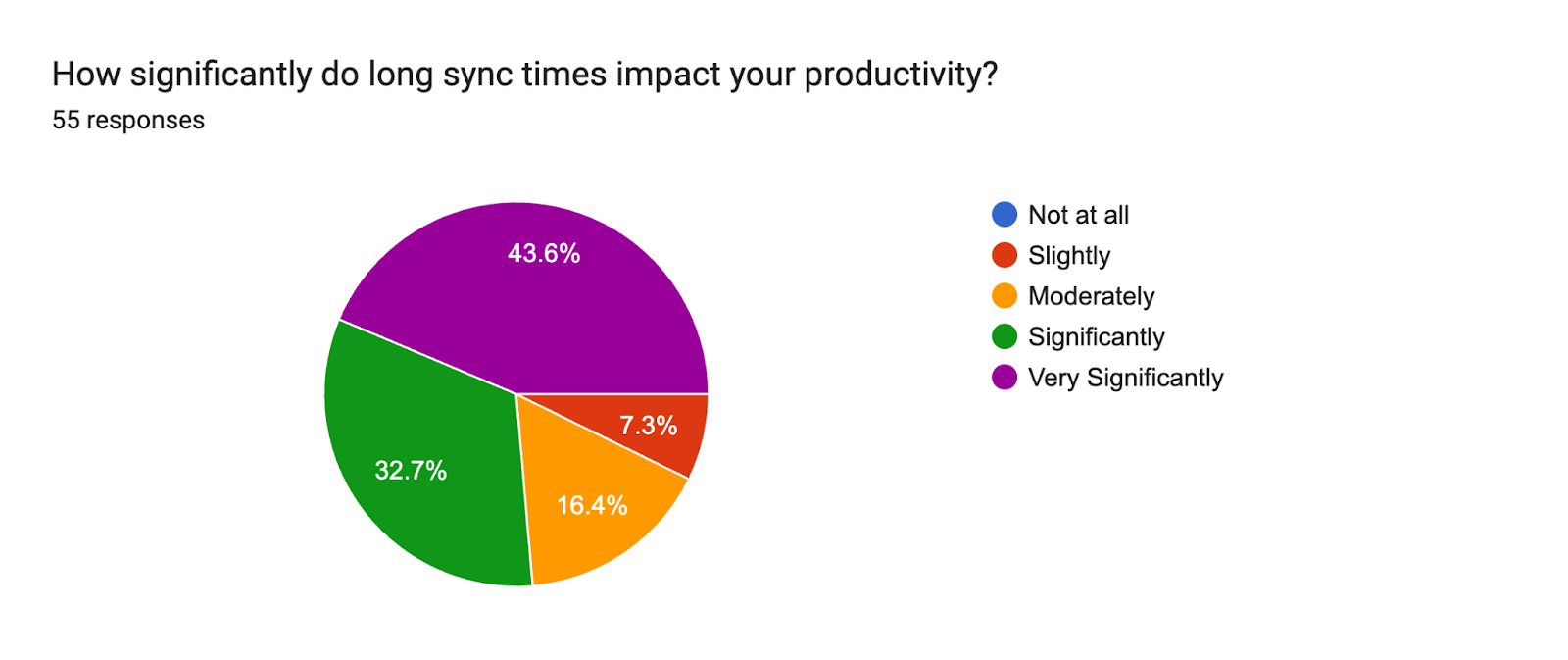
The survey validated our anecdotal feedback: developers were frustrated. Slow, sluggish IDE performance was eroding productivity and disrupting flow. We set out to determine whether developers really needed to load every module to work on just one.
Investigation
Root cause
The root cause was straightforward: module count. With roughly 2,000 modules in the codebase, a full sync required Gradle to configure every single module, including parsing build files, resolving dependencies, and generating IDE project models, regardless of whether the developer actually needed them. A developer working on the Payments feature still had to wait for Gradle to process Food, Transport, Mart, and every other module. The configuration time and resulting memory consumption grew roughly in proportion to module count, and the count kept rising.
Exploring community solutions
We looked at existing solutions in the Android community. One promising candidate was the Focus plugin from Dropbox. Here’s how the Focus plugin works:
- The developer runs a Gradle command to focus on a specific module (e.g.
./gradlew :module:focus). - The Gradle task calculates the dependency graph, generates a separate focused settings file, and writes a
.focusmarker file that tells Gradle to use it instead of the full project settings. - The developer syncs the IDE, which now only configures the focused modules.
This approach works because instead of syncing the entire repository, the developer only configures the module they are working on, along with its required dependencies. Everything else is excluded.
For example, if you are working on the Payments module, only Payments and its dependency chain get loaded. Food, Transport, and Mart modules are excluded entirely.
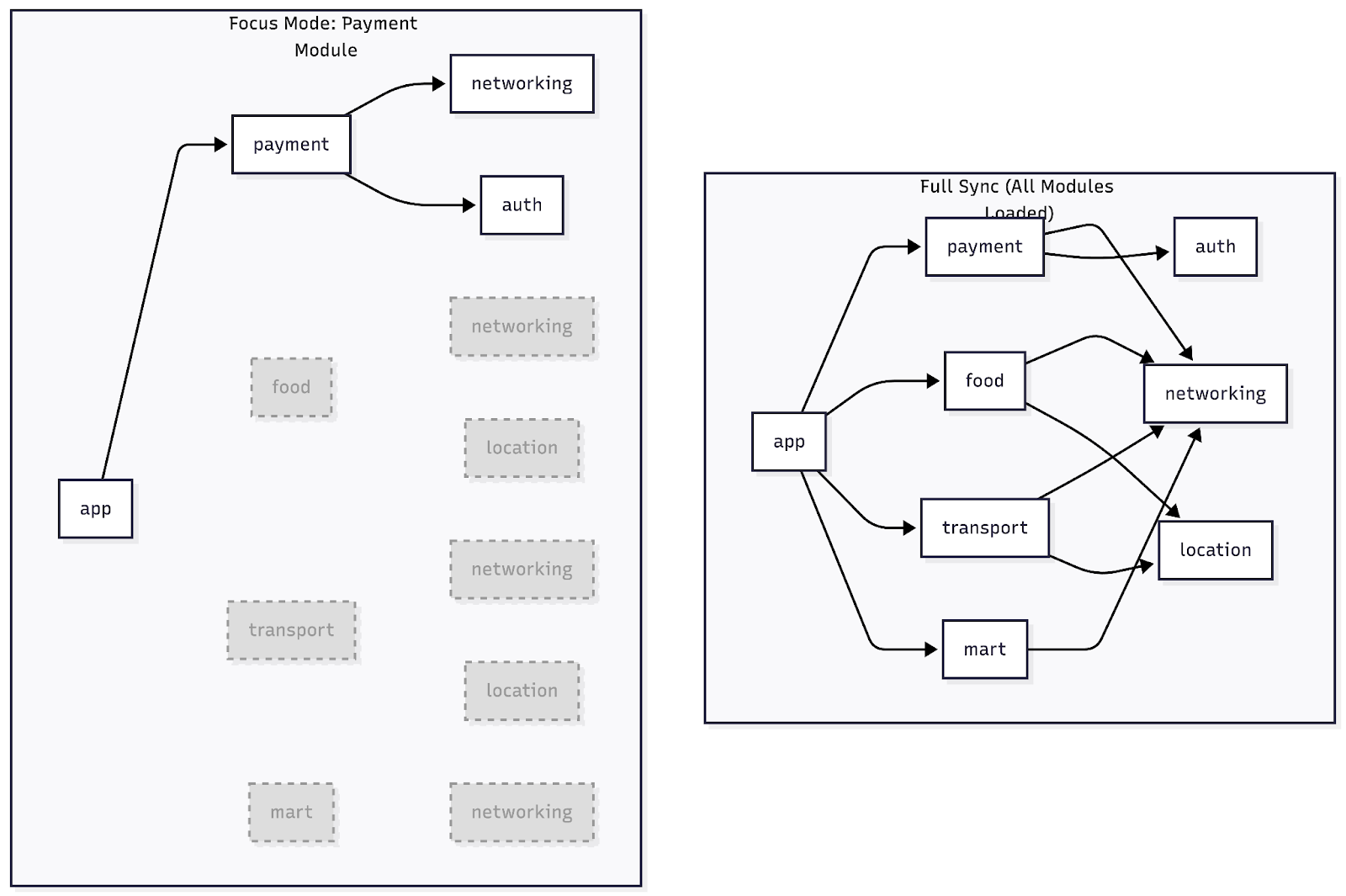
Depending on the size of the target module, this approach can cut the number of loaded modules by 50% or more, especially with a well-structured modularization architecture. We wanted to adopt this approach and saw an opportunity to improve it further by leveraging our existing Gradle-to-Bazel migration workflow.
Our solution: Building a custom Focus plugin
The Dropbox Focus plugin was a great starting point, but it introduced several friction points in our setup:
- We would need to move all non-essential declarations from
settings.gradleinto a separatesettings-all.gradlefile. - We would need guardrails to ensure new modules are declared in the correct file.
- Most critically, focusing on a module requires running a Gradle task (e.g.,
./gradlew :module:focus), which itself goes through Gradle’s configuration phase and adds a noticeable delay before a developer can even start an IDE sync.
We set out to address each of these issues.
Challenge 1: Eliminating the configuration phase
The Dropbox Focus plugin recalculates the dependency graph every time a developer runs the focus command. This means every Focus operation pays the cost of Gradle’s configuration phase, parsing every build.gradle file in the project to resolve the full dependency tree.
We realized we already had this information. Our build infrastructure includes Grazel, which migrates Gradle build files to their Bazel equivalents via a migrateToBazel task, and our Continuous Integration (CI) validations ensure that both are aligned. This task already traverses the full dependency graph for migration purposes.
Our insight: generate a dependency graph as a static file during migrateToBazel and reuse it for focus operations.
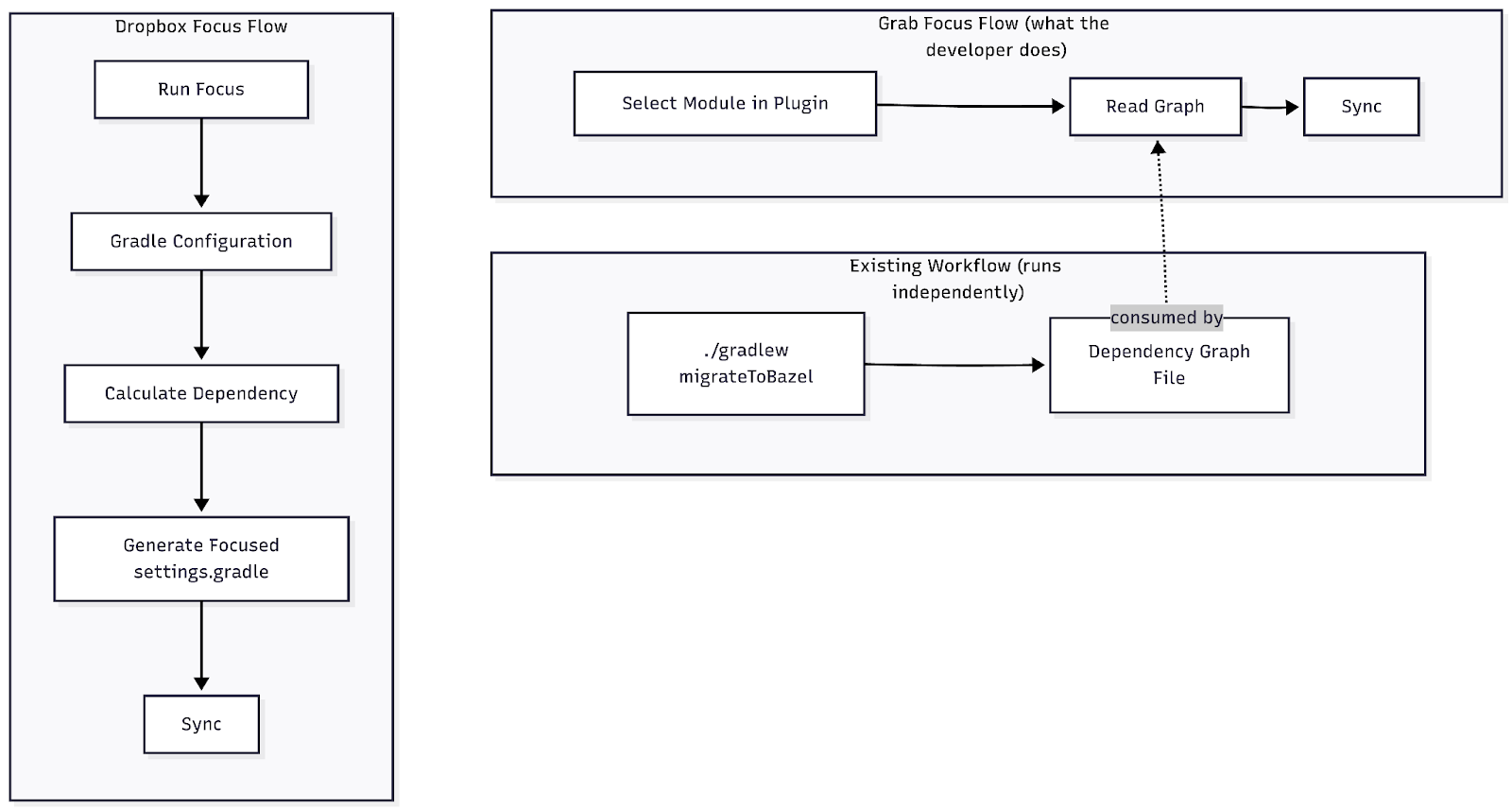
By pre-computing and persisting the dependency graph, we skip the Gradle configuration phase entirely. The focus operation becomes a fast, local file lookup instead of a lengthy Gradle computation. The developer simply selects their module and syncs.
The dependency graph is stored as a JSON file, which is lightweight and fast to read. The trade-off is that it requires a migrateToBazel run to stay up-to-date. When creating a new module or changing module dependencies, developers need to rerun ./gradlew migrateToBazel to regenerate the graph. We accepted this because developers already had to run migrateToBazel before merging to master (to ensure Bazel files are current). The graph stays fresh as part of their existing workflow, and no extra step is required.
Challenge 2: Minimizing developer friction with a Gradle plugin
We did not want to introduce a process that adds cognitive load. Migrating all module declarations to a new settings.gradle file would require every team to change their workflow. Instead, we adopted a more elegant approach.
The include shadow trick
In a standard Android project, modules are declared in settings.gradle using the include function:
include 'app'
include 'payment'
include 'food'
// ... hundreds more
The include function is part of the Gradle Settings API. In Groovy, you can define a local closure variable with the same name as an existing method. Since Groovy resolves local variables before delegate methods, the closure effectively shadows the original include method and all subsequent include calls in the script invoke the closure instead.
We created a custom Gradle plugin with a focusInclude function that decides whether to include or exclude a module based on the current focus configuration. By adding just three lines to the top of settings.gradle, we redirect all include calls through our plugin:
// After applying the focus plugin in the buildscript block
def include = { module ->
 com.grab.focus.GradleFocusPluginKt.focusInclude(settings, module)
}
include 'app'
include 'payment'
include 'food'
The rest of the file remains untouched. Every existing include call now passes through focusInclude, which checks whether the module should be loaded based on the developer’s focus selection. If no focus is active, all modules are included as usual with zero behavior change.
This approach meant zero migration effort for feature teams. The settings.gradle file stays as-is, and the plugin integrates seamlessly.
Early implementation: Property-based focus
In the early days of this plugin’s development, the way to specify focus modules was via a Gradle property in the command line:
./gradlew build -Pmodules-to-sync=":app,:payment"
The focusInclude function reads this Gradle property. If present, it activates focus mode and only includes the specified modules (and their transitive dependencies resolved from the graph file). If absent, all modules are included normally.
Challenge 3: Making it seamless with an Android Studio plugin
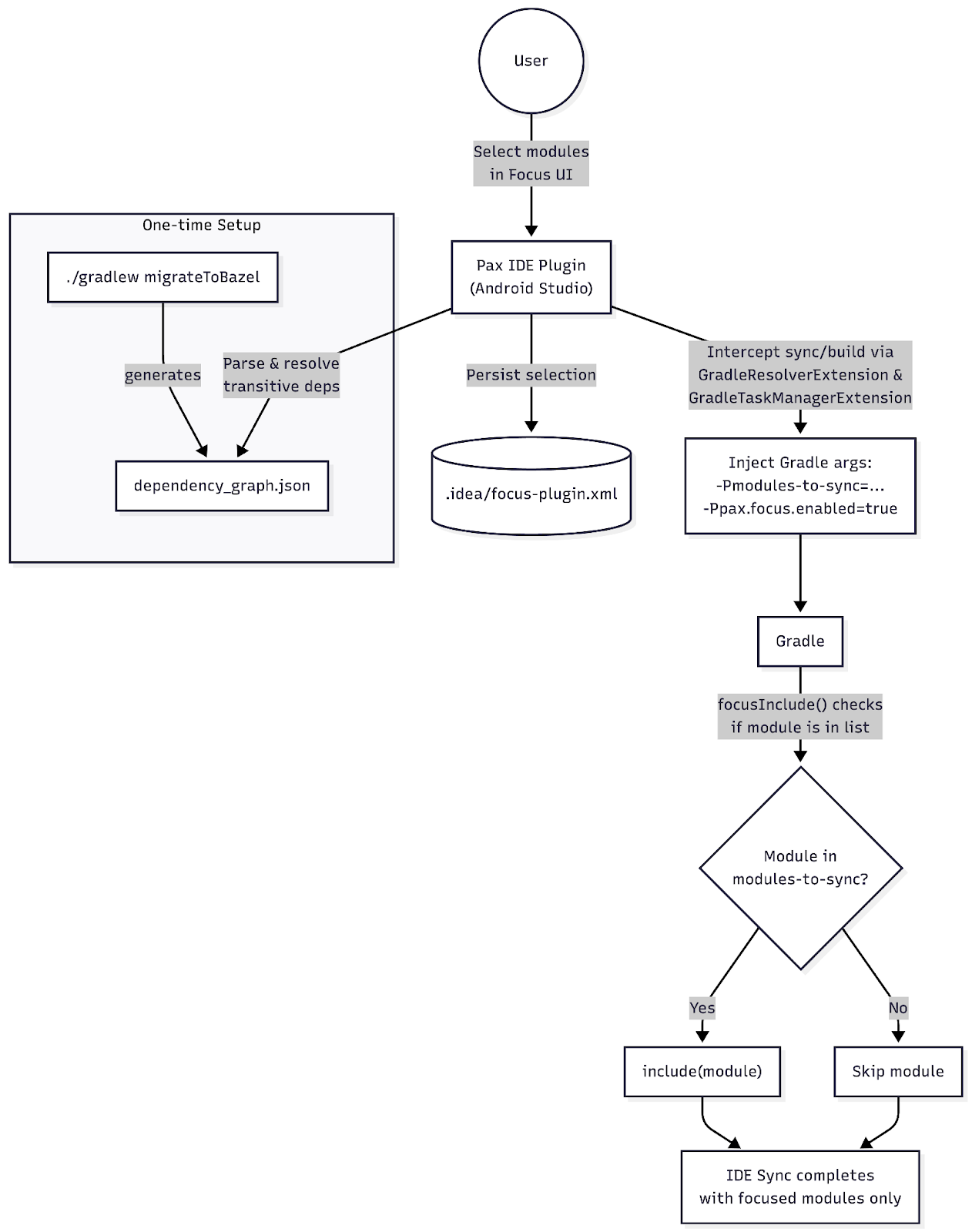
Manually passing Gradle properties on the command line was functional but not ideal. We needed a better developer experience. The Gradle property approach opened the door to IDE integration; this led to an Android Studio plugin (an IntelliJ plugin) being built that automates the entire flow through a user interface (UI):
- Module selection: The plugin presents a list of all available modules, parsed from the pre-computed dependency graph file. Developers select which modules they want to work on.
- Dependency count indicator: Since we have the full dependency graph, the plugin displays how many transitive dependencies each module requires. This gives developers immediate visibility into module “weight” and encourages teams to keep their modules lean.
- Automatic argument injection: The plugin uses two IntelliJ Gradle extension points to inject the
-Pmodules-to-syncproperty: aGradleResolverExtensionthat adds the argument during project sync, and aGradleTaskManagerExtensionthat injects it before any Gradle task execution (including Compose preview builds). The developer just clicks sync; the plugin handles the rest.
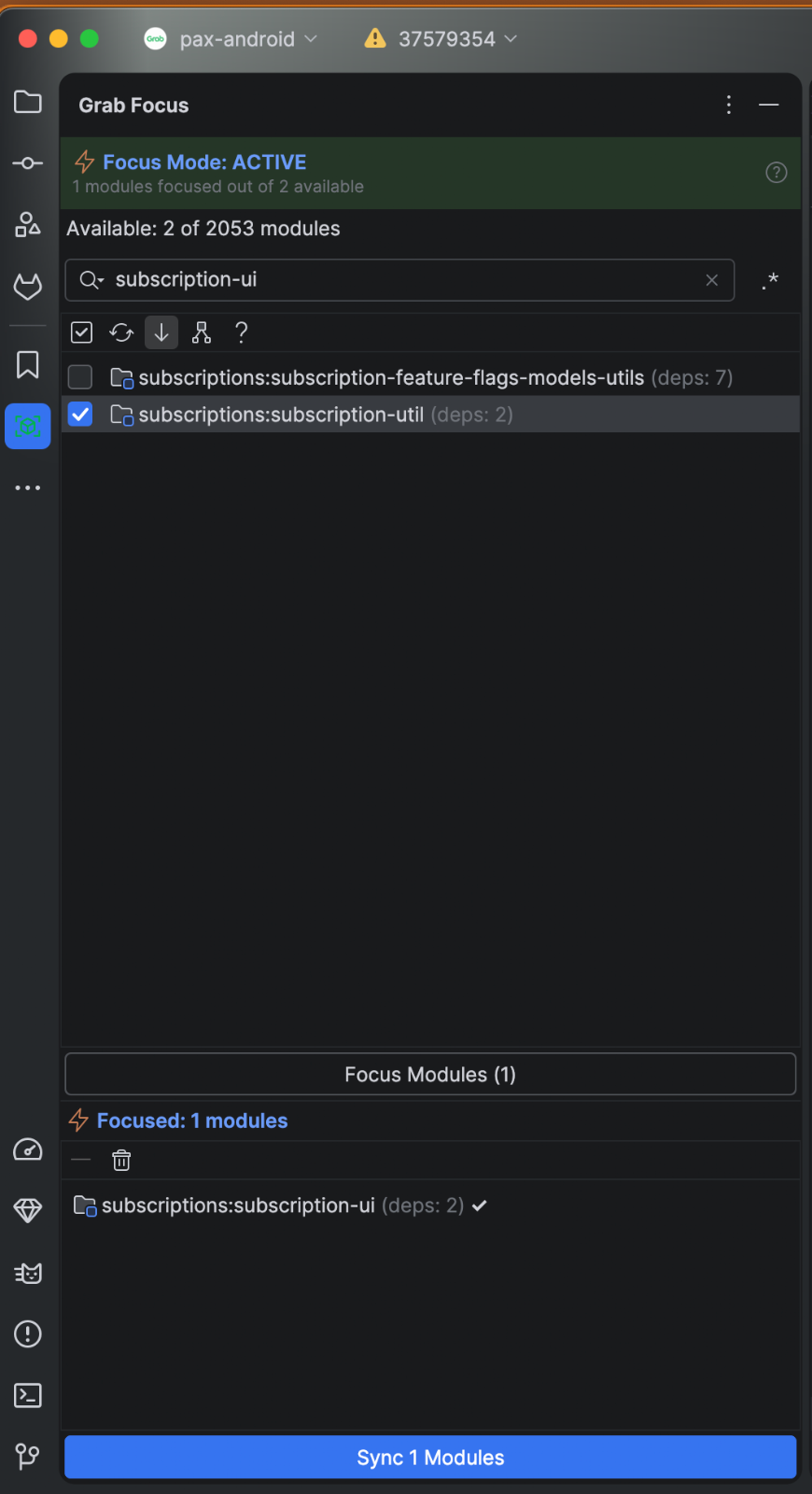
Beyond the core functionality, we added several usability enhancements to the plugin:
- Indirect focus indicator: Modules that will be synced as a transitive dependency of a focused module are marked as “indirectly focused,” giving developers visibility into exactly what will be loaded.
- Search and filtering: With hundreds of modules, finding the right one matters. The plugin supports fuzzy matching and regular expression (regex) search to quickly narrow down the module list.
- Sort by dependency count: Modules can be sorted by name or by dependency count, making it easy to spot the heaviest modules at a glance.
- Status bar widget: A persistent “Focus: X/Y” indicator in the IDE status bar shows how many modules are currently focused out of the total, with a click-through to the Focus tool window.
- State persistence: The developer’s focus selection is saved and restored between IDE sessions, so they do not need to reselect modules after restarting Android Studio.
Encouraging lean module architecture
An unplanned but welcome side effect of the focus plugin was that it nudged teams toward a cleaner module architecture. With dependency counts now visible in the IDE, developers became more aware of their module’s size, which in turn encouraged a clearer separation between interface and implementation.
- Interface module (e.g.,
:payment-api): Contains only the public API definitions (interfaces, data classes, contracts). This is the module that other teams depend on. Because it has no implementation details, it carries very few transitive dependencies. - Implementation module (e.g.,
:payment-impl): Contains the actual implementation of those interfaces. This module typically has a larger dependency footprint, but only the owning team needs to load it.
By depending on the interface module rather than the implementation module, teams avoid pulling in a large tree of transitive dependencies. This keeps the dependency count low for consumers, which directly translates to faster focus sync times and leaner Compose preview builds.
How we measure
Instrumentation: The PAX IDE plugin
The PAX IDE plugin is a mandatory install for every PAX Android engineer in Grab. This gives us a consistent, organization-wide data collection baseline without requiring any opt-in. The plugin registers four IntelliJ Platform listeners that automatically capture metrics on every relevant IDE event:
| IntelliJ API | What it tracks |
|---|---|
GradleSyncListenerWithRoot |
Sync time |
ProjectIndexingActivityHistoryListener |
Indexing time |
ProjectIndexingActivityHistoryListener |
Scanning time |
PerformanceListener |
IDE freezes |
Each metric event is enriched with shared context captured at event time: IDE version and build number, heap memory usage, focus state (enabled/disabled, number of focused modules), Operating System (OS) info, and project name. This means every data point is automatically segmented by whether focus mode was active, which is exactly what we need for before/after comparisons.
What each metric captures
-
Sync time: We implement
GradleSyncListenerWithRootand calculate wall-clock duration fromsyncStarted()tosyncSucceeded()orsyncFailed(). This covers the full Gradle configuration, dependency resolution, and IDE model generation phase. -
Indexing time:
ProjectIndexingActivityHistoryListener.onFinishedDumbIndexing()provides aProjectDumbIndexingHistoryobject. We readhistory.times.totalUpdatingTime, the time IntelliJ spent updating its symbol index after the sync. -
Scanning time:
ProjectIndexingActivityHistoryListener.onFinishedScanning()provides aProjectScanningHistoryobject. We readhistory.times.totalUpdatingTimeandhistory.times.scanningType(full vs. partial) for additional segmentation. -
IDE freezes:
PerformanceListener.uiFreezeFinished(durationMs)is called by the platform whenever the Event Dispatch Thread (EDT) is blocked long enough to be classified as a freeze. The duration arrives directly as a parameter. -
IDE memory usage: Captured at the moment of each metric event via
Runtime.getRuntime(). Captures used memory (totalMemory - freeMemory) and max heap. Attached to every event as part of the shared context. -
IDE version: From
ApplicationInfo.getInstance(), captures version name, full version string, and build number. Also attached to every event, enabling per-version breakdowns.
Survey
After each successful sync, the plugin triggers an in-IDE notification prompting developers to fill out a short survey. The notification respects developer attention; it uses a weekly reset cycle with a “Don’t remind me again” option that appears after the second prompt. These periodic qualitative check-ins complement the telemetry data and help surface pain points that raw numbers alone may not capture.
Establishing the baseline
The plugin collects focus_enabled on every event. Therefore, baseline numbers come directly from the same pipeline; they are simply the subset of metric events where focus_enabled = false. This means the before/after comparison is an apples-to-apples measurement from the same instrumentation, same engineers, same codebase, with no separate manual benchmarking required.
Results
Compose preview build
The focus approach also improved Jetpack Compose preview builds. Compose previews require a module build to render, and with fewer modules loaded, the IDE has significantly less indexing overhead. A typical UI module has just 5–10 local dependencies. With the focus plugin, a developer configures only those modules instead of all 2,000. Developers consistently report that Compose previews feel significantly more responsive in focus mode.
As a best practice, we recommend that teams separate their UI into dedicated modules containing only composable functions and minimal dependencies. This maximizes the benefit of focus mode for preview builds.
Memory usage
In focus mode, excluded modules are not configured by Gradle and not indexed by the IDE, significantly reducing both build-process and editor memory consumption from approximately 10 GB down to 2 GB. This frees up memory for Bazel builds and other tooling. Developers reported fewer freezes, faster code navigation, and more responsive autocompletion.
Sync time
We observed a dramatic reduction in per-sync IDE sync time. A full sync previously took around 26 minutes at the 95th percentile (p95). With the Focus plugin, sync times dropped to under 2 minutes for typical feature work. The p95 remains higher for modules with deep dependency trees, but in practice, sync times vary significantly depending on module size. A typical UI module with 5 to 10 dependencies syncs in roughly 2 minutes, while heavier modules with deep dependency graphs take longer. For most developers working on focused feature work, the improvement is dramatic.
Tradeoffs
Focus mode does come with limitations. IDE features like “Find Usages” and cross-module refactoring only cover the focused modules; developers occasionally need to expand their focus set or temporarily switch to a full sync for repo-wide operations. In practice, this has been a minor inconvenience compared to the productivity gained.
Conclusion
IDE sync time is one of those problems that slowly degrades the developer experience without a single dramatic breaking point.
Our solution combined three key ideas:
-
Reuse existing infrastructure: By generating the dependency graph during
migrateToBazel, we eliminated the expensive Gradle configuration phase without adding a new build step. -
Minimize adoption friction: The Groovy include shadow trick let us integrate the focus mechanism with just three lines of code, requiring zero changes from feature teams.
-
Invest in user experience (UX): The Android Studio plugin turned a manual, error-prone process into a one-click operation with useful module health indicators.
The results spoke for themselves. IDE sync time dropped from 35 minutes to under 1 minute (depending on module size). IDE memory consumption fell from 10 GB down to 2 GB, freeing up headroom for Bazel builds to run alongside the IDE. Compose preview update times improved significantly due to reduced indexing overhead. And adoption was frictionless. Engineers went from a manual, multi-step process to a simple Select → Focus → Sync flow with native IntelliJ integration.
As the codebase continues to grow, accelerated by AI-assisted development and a broader contributor base, we are also investing in guardrails to keep quality in check. An area we are actively exploring is using skills.md to guide AI coding agents when they generate new modules, encoding architectural conventions and dependency rules directly into the context that AI tools consume. This helps ensure that AI-generated code lands in the right shape from the start, rather than accumulating structural debt that compounds the sync and build problems described above.
Join us
Grab is a leading superapp in Southeast Asia, operating across the deliveries, mobility, and digital financial services sectors, serving over 900 cities in eight Southeast Asian countries: Cambodia, Indonesia, Malaysia, Myanmar, the Philippines, Singapore, Thailand, and Vietnam. Grab enables millions of people every day to order food or groceries, send packages, hail a ride or taxi, pay for online purchases or access services such as lending and insurance, all through a single app. We operate supermarkets in Malaysia under Jaya Grocer and Everrise, which enables us to bring the convenience of on-demand grocery delivery to more consumers in the country. As part of our financial services offerings, we also provide digital banking services through GXS Bank in Singapore and GXBank in Malaysia. Grab was founded in 2012 with the mission to drive Southeast Asia forward by creating economic empowerment for everyone. Grab strives to serve a triple bottom line. We aim to simultaneously deliver financial performance for our shareholders and have a positive social impact, which includes economic empowerment for millions of people in the region, while mitigating our environmental footprint.
Powered by technology and driven by heart, our mission is to drive Southeast Asia forward by creating economic empowerment for everyone. If this mission speaks to you, join our team today!